

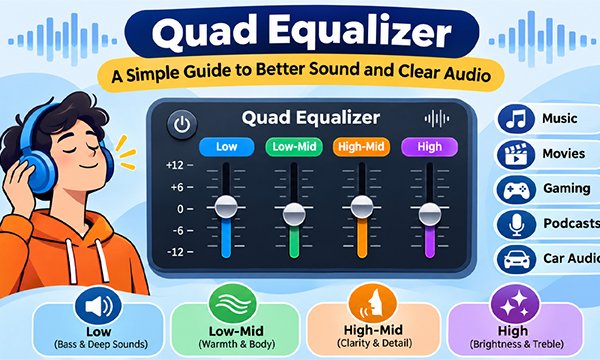
Have you ever played music and felt the bass was too strong? Maybe the singer was hard to hear. A Quad Equalizer can help fix these simple sound problems. It gives you more control over how your audio sounds.
You do not need to be a sound expert to use one. A few small changes can make music clearer. They can also help with movies, games, podcasts, and calls. The main goal is to make sound feel balanced.
In this guide, we will explain what a Quad Equalizer is and how it works. We will also cover its four sound bands, main controls, different types, setup steps, and useful settings. Everything will be explained in easy words.
What Is a Quad Equalizer?
A Quad Equalizer is a tool used to change the balance of sound. It lets you control certain parts of the audio instead of changing everything at once. This can help you fix bass, voices, and sharp sounds.
The word “quad” means four. In a common four-band EQ, sound is split into four main areas. These are low, low-mid, high-mid, and high. Each area controls a different part of what you hear.
However, quad can also mean four audio channels. A four-channel EQ may control four separate sound signals. This is common in some pro sound systems. Four bands control sound ranges, while four channels control separate audio signals.
How Does a Quad Equalizer Work?
Every sound contains different frequencies. Low frequencies give you deep bass. Mid frequencies hold much of the sound from voices and instruments. High frequencies add bright sounds and small details.
A Quad Equalizer lets you raise or lower these areas. The amount of change is often shown in decibels, or dB. A setting of 0 dB means no change. A positive number adds sound, while a negative number reduces it.
Imagine that music sounds heavy and the singer is hard to hear. You could lower the bass or low-mid area a little. This may help the voice sound clearer. Small changes of around 1 to 3 dB are often enough.
Four Bands of a Quad Equalizer
The four bands help you control different parts of your audio. The exact frequency range can change from one device to another. Still, most four-band systems follow a similar basic layout.
The low band is often around 20 Hz to 250 Hz. Low-mid may cover about 250 Hz to 2 kHz. High-mid may cover 2 kHz to 6 kHz. High frequencies may run from about 6 kHz to 20 kHz.
The low band controls deep bass and kick drums. Low-mid adds warmth and body. High-mid helps voices and details stand out. The high band controls treble, brightness, and fine details in the sound.
Main Quad Equalizer Controls
Gain is one of the main controls on a Quad Equalizer. It tells the EQ how much to raise or lower a sound area. For example, +2 dB gives a small boost, while -2 dB makes a small cut.
Some EQ systems also let you choose the exact frequency. More advanced models may have a Q control. Q decides how wide the change will be. A wider setting affects more nearby sounds. A narrow setting focuses on a smaller area.
You may also see bypass and output controls. Bypass lets you hear the sound without EQ. This makes comparison easy. Output controls the final level. Some digital models also include filters, saved presets, and channel linking.
Types of Quad Equalizers
A graphic equalizer is one of the easiest types to understand. It has fixed frequency areas. You simply raise or lower each one. This type works well for people who want quick and simple sound control.
A parametric EQ gives you more choices. It may let you control frequency, gain, and Q. A semi-parametric model gives you some of these options, but not all. These types are common in mixers and music work.
Digital and software equalizers are also popular in 2026. You can find them on computers, phones, music apps, and other audio devices. Some offer simple sliders. Others have presets, filters, graphs, and many sound controls.
How to Set Up a Quad Equalizer
Start with every band at 0 dB. This is called a flat setting. It gives you a clean starting point. If possible, turn off other bass boosts, sound effects, or extra EQ systems before you begin.
Next, play a song, movie, or voice recording you know well. Listen for one problem. Is the bass too heavy? Lower the low band a little. Are voices muddy? Try a small cut in the low-mid area.
Change only one band at a time. Listen carefully after each change. Use the bypass control if your EQ has one. Compare both versions at a similar volume. Stop when the audio sounds clear, natural, and balanced.
Best Quad Equalizer Settings
There is no perfect Quad Equalizer setting for every person. Your speakers, headphones, room, car, and audio source can all change what you hear. Your own taste also plays a big part.
For music, staying close to 0 dB is a good place to begin. Add a little low sound if the bass feels weak. Lower low-mid if the music feels muddy. Add a small high boost if the sound feels dull.
For movies and games, clear voices are often more useful than very strong bass. A small high-mid boost may help speech and details stand out. Keep every change small, then listen before changing another band.
Quad Equalizer for Music and Instruments
A Quad Equalizer can be very useful for music. Singers, music makers, and home users can use it to balance sound. It can make bass cleaner, help vocals stand out, and stop some instruments from covering others.
For example, a voice may sound thick because there is too much low-mid sound. A small cut in this area can make the voice clearer. If a guitar sounds dull, a small high-mid boost may help it stand out.
Guitar and bass players also use four-band EQ controls. Bass controls deep sounds. Low-mid adds body. High-mid adds clear detail. Treble adds brightness. Small changes can help the instrument fit better with the rest of the music.
Quad Equalizer Problems and Easy Fixes
Sometimes audio sounds muddy or too heavy. This may happen when there is too much low or low-mid sound. Try lowering these areas a little. Do not make a large cut right away. Start small and listen again.
Harsh voices can be another problem. Too much high-mid sound may make speech feel sharp. Lower this band slightly. If the whole sound feels too bright, reduce the high band. This can also help reduce unwanted hiss.
Large boosts can cause clipping or distortion. If this happens, lower the boosted bands. You can also lower the output level. If everything sounds wrong, return all bands to 0 dB and start again.
Quad Equalizer vs Other Equalizers
A three-band EQ normally gives you bass, mid, and treble controls. A Quad Equalizer adds another band. This gives you more control over the middle part of the sound without making the system too hard to use.
A ten-band EQ gives you even more sound areas. This can be useful when you want to make detailed changes. However, more bands do not always mean better sound. They simply give you more places to make changes.
A four-band EQ is often easier for new users. A parametric four-band EQ can also give deep control because you may choose the frequency, gain, and Q. The best choice depends on how much control you need.
Benefits and Limits of a Quad Equalizer
One big benefit of a Quad Equalizer is better sound balance. It can make speech easier to hear. It can reduce muddy bass. It can also soften sharp treble or help quiet details become easier to notice.
You can also make different settings for different uses. Your headphones may need one setting, while your car speakers need another. Music, games, movies, and podcasts can also sound better with their own simple EQ changes.
Still, EQ cannot fix everything. It cannot repair a broken speaker or damaged headphones. It cannot bring back details missing from a poor recording. It also cannot turn a small speaker into a powerful subwoofer.
Tips to Get Better Sound With a Quad Equalizer
Always start with a flat setting at 0 dB. Listen to audio that you know well. Find one problem first. Then make a small change of around 1 to 3 dB and listen again before doing anything else.
Try cutting unwanted sound before making a large boost. For example, if vocals are hidden by heavy bass, lowering the bass may work better than greatly raising the voice area. This can also lower the risk of distortion.
Use the bypass button when possible. Compare the new sound with the old sound at about the same volume. Do not keep changing settings just because you can. If the sound feels clear and balanced, you can stop.
Can a Quad Equalizer Improve Sound Quality?
Yes, a Quad Equalizer can improve sound when poor frequency balance is the main problem. It can help when bass feels too strong, voices sound muddy, or high sounds feel too sharp.
The result depends on your audio system. Good headphones may need very little EQ. Small speakers may need different changes. Your room and speaker position can also affect how bass and other sounds reach your ears.
Better sound does not always mean more bass and treble. Sometimes the best change is a small cut. In many cases, settings close to 0 dB can give the most clean and natural sound.
Conclusion
A Quad Equalizer is a simple way to take more control of your sound. It usually gives you four main areas to adjust. These are low, low-mid, high-mid, and high frequencies.
You can use it for music, movies, gaming, podcasts, cars, guitars, and many other audio setups. The key is to make small changes. Listen after each change instead of moving every control at once.
There is no perfect EQ setting for everyone. Start at 0 dB, find the sound problem, and make one small change. Your ears should guide the final choice. Clear and balanced sound is more important than extreme settings.
(FAQs)
Can a Quad Equalizer really make cheap speakers sound better?
Yes, sometimes. A Quad Equalizer can reduce muddy bass and sharp treble. However, it cannot fix broken speakers or make small speakers work like a powerful sound system.
Can too much EQ damage your speakers?
It can increase the risk. Large bass boosts at high volume can make speakers work harder. Small changes, such as 1 to 3 dB, are usually a better choice.
Why does music sometimes sound worse after using EQ?
You may have changed too many bands at once. Return everything to 0 dB. Then change one band at a time until the sound becomes clear and balanced.
Is more bass always better for sound?
No. Too much bass can hide voices and other details. It can also make music sound muddy. A small bass boost often sounds better than a very large one.
Does a Quad Equalizer improve gaming sound?
Yes, it can help. Lower bass may stop explosions from hiding other sounds. A small high-mid boost can make voices and footsteps easier to hear in some games.
Up Next: Tracqueur: Everything You Need to Know About Modern Tracking
