

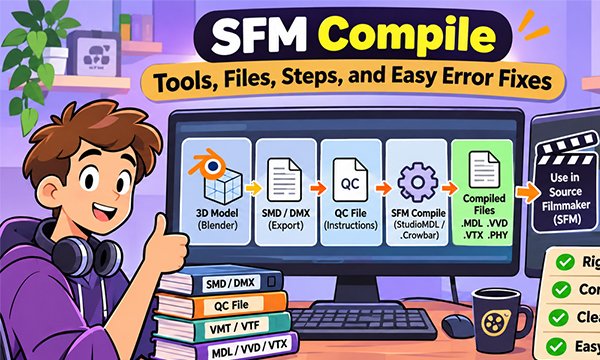
Making a custom model for Source Filmmaker can be fun. But your model cannot simply move from Blender into SFM. Source Filmmaker needs special model files. This is where SFM Compile becomes an important part of the process.
Think of compiling as translation. You create and edit your model in Blender or another 3D program. You then export Source-ready data. The compiler reads this data and builds files that Source Filmmaker knows how to use.
In this guide, we will explain the full process in simple words. We will cover important files, useful tools, model setup, folders, QC files, compiling, testing, and common errors. You will also learn how to find problems without guessing.
What Is SFM Compile and How Does It Work?
SFM Compile is the process of turning Source-ready model data into compiled model files. Source Filmmaker cannot use a normal Blender project as its final model. The model must first pass through the Source model pipeline.
A common workflow starts with Blender. You prepare your mesh, bones, UVs, and animations there. Next, you export the needed data as SMD or DMX. A QC file then tells the compiler how the model should be built.
The basic flow is easy to remember: create the model, export it, prepare the QC file, compile it, and test it in SFM. StudioMDL does the actual model compilation. Crowbar can make this process easier to manage.
Important Files Used in SFM Compile
Several files work together during SFM Compile. SMD and DMX files can hold model data used by the compiler. Depending on the model, this can include the mesh, skeleton, or animation information needed for the final asset.
The QC file works like a set of building instructions. It tells StudioMDL which source files to use. It can also tell the compiler where the finished model should go and where its materials should be found.
After compilation, you will normally see an MDL file with supporting files such as VVD and VTX. A PHY file may appear when physics data is used. Materials are handled separately through VMT and VTF files.
Best Tools for SFM Compile
StudioMDL is the main tool that builds Source model files. It reads your QC instructions and processes the files listed inside them. You can use StudioMDL from the command line if you want direct control over the compile process.
Crowbar gives you an easier visual way to work with Source model tools. You can choose a QC file, select your game setup, start the compile, and read the log. This makes Crowbar friendly for people learning the workflow.
Blender is useful for creating and fixing the model itself. Blender Source Tools can help with SMD and DMX files. A text editor is useful for QC files. HLMV can also help you inspect a compiled model before deeper testing.
Crowbar vs StudioMDL for SFM Compile
Crowbar and StudioMDL are closely connected, but they are not the same thing. StudioMDL performs the model compile. Crowbar gives you a graphical way to set up and run Source model tools without typing every command yourself.
For a beginner, Crowbar can feel much easier. You can browse for the QC file and check the output in one place. If something goes wrong, the compile log can show where the problem started.
It is still helpful to understand StudioMDL. This helps you understand what Crowbar is doing for you. It also becomes useful when you want command-line control, repeatable scripts, or a clearer look at how the compiler works.
Prepare Your Model Before SFM Compile
A compiler cannot magically fix a broken model. Before starting an SFM Compile, check the mesh first. Look for unwanted parts or broken geometry. Make sure the UV layout is ready if the model needs textures.
For a rigged model, check the bones and weights too. Bone names should stay clear and stable. Make sure the mesh moves with the correct bones. Animation files should use the same skeleton setup as the main model.
Scale and transforms also matter. Check them before exporting. If your model needs custom collision, keep the collision mesh simple. A very detailed visual model does not always make a good physics model.
Organize Your SFM Compile Files
Good folders can save a lot of time. Keep your source files in one clear place. For example, your SMD or DMX files and QC file can stay inside a model source folder. Give each file a simple name.
Keep materials organized too. Your VMT and VTF files should sit in the correct material folders used by Source Filmmaker. Random folders and unclear names make path problems much harder to find later.
Before compiling, do a simple path check. Look at the output path in $modelname. Then check $cdmaterials. Finally, compare both with the real folders used by SFM. If these paths do not match your setup, fix them first.
Create a Simple QC File
The QC file is one of the most important parts of SFM Compile. It tells StudioMDL what to build. A basic QC can define the finished model name, source mesh, material folder, animation sequence, and optional collision model.
Commands such as $modelname set the model output. $body can point to the main mesh. $cdmaterials tells the model where materials are expected. $sequence is used to define an animation sequence for the compiled model.
Keep your first QC simple. Do not add skins, many bodygroups, flexes, attachments, and lots of animations at once. First, get a plain model working. Once it loads correctly, you have a safe starting point for the next steps.
How to Run an SFM Compile Step by Step
Once your QC file is ready, you can start the SFM Compile. First, make sure your SMD or DMX file is the newest export. Also, check that every file named inside the QC is still in the right folder.
Crowbar gives you a simple way to compile. Open the compile area, choose your QC file, and select the correct Source Filmmaker game setup. Start the compile and watch the log. Do not close it as soon as the process ends.
You can also use StudioMDL from the command line. This gives you more direct control. In both cases, read the first useful error if something fails. One missing file can sometimes cause several other errors later in the log.
Up Next: Daniel Clifton Pratt: Everything to Know About Chris Pratt’s Dad
Check and Test Your Compiled SFM Model
A successful compile normally creates an MDL file with other model files. These may include VVD and VTX files. A PHY file may also appear when your model uses compiled physics or collision data.
Keep these model files together. Do not move only the MDL file and expect everything to work. Your materials also need to stay in the correct materials folder. They are separate from the compiled model file set.
Now test your model. HLMV can be useful for a first check. Look at the mesh and materials. Then open Source Filmmaker and load the model. For a character, test some bones and poses before doing serious animation work.
Common SFM Compile Errors and Easy Fixes
Errors are normal when learning SFM Compile. A missing SMD file may simply mean the QC points to the wrong place. A QC error may come from a wrong command, missing file, or small typing mistake.
Sometimes the compile works, but the model does not appear where expected. Check $modelname and your game setup. Your model may have compiled into another folder instead of the folder you are checking inside Source Filmmaker.
If SFM crashes when loading a custom model, return to a simple version. Remove optional features and test again. Add collision, extra animations, bodygroups, and other parts one at a time. This helps you find the change causing trouble.
Fix SFM Compile Texture and Path Problems
Purple and black checkerboards are a common sight in Source Filmmaker. They usually mean the engine cannot find or load the expected material or texture. This does not always mean your model compile itself has failed.
Start with $cdmaterials. Check that it points toward the material folder your model should use. Next, open the VMT file and check its texture reference. Make sure the matching VTF file is stored where that reference expects it.
Path problems can feel annoying, but there is a simple way to handle them. Compare one path at a time. Check the QC, material file, and real folder. Fixing one clear problem is much easier than changing many files together.
Up Next: Kimberly Buffington: What Happened After Her Marriage to Dennis Quaid?
Make Your SFM Compile Workflow Faster
A good SFM Compile workflow is not about rushing. It is about making problems easy to find. Start with the smallest working model. Compile it and test it before adding extra features.
When that simple model works, save the QC as your known-good version. Then add one new feature. You might add collision first. Compile and test again. Next, you could add a new animation and repeat the same process.
This method may feel slower at first, but it can save hours later. Crowbar setups can also help with repeated work. If you manage many models, batch compiling can save more time. Just keep your folders and source files clean.
SFM Compile for Props and Characters
Not every model needs the same setup. A simple static prop may only need a mesh, materials, a basic sequence, and optional collision data. There is little reason to give a small prop a huge character QC file.
Characters are different. They can have many bones and animation sequences. They may also use skins, bodygroups, flexes, and attachments. Each extra feature gives you another part that may need testing during the SFM Compile process.
Build these features slowly. First, make sure the character appears correctly. Then check the skeleton and materials. After that, test animations and other features. A simple working model gives you a strong base for more detailed work.
Final SFM Compile Checklist
Before every compile, check that your SMD or DMX file is the latest version. Make sure every file named in the QC really exists. A quick check now can save you from reading a long error log later.
Next, check your main paths. Look at $modelname and $cdmaterials. Check the real Source Filmmaker folders too. For a rigged model, check the bones. If you use custom collision data, check that source file as well.
Finally, compile the simple version before adding more parts. Test it in HLMV or SFM. When everything works, keep that version safe. It becomes your baseline if a later change causes an error or makes the model stop working.
Conclusion
SFM Compile becomes much easier when you see it as a clear set of steps. Prepare your model, export Source-ready files, write a clean QC, compile the model, check the output, and test everything inside Source Filmmaker.
When something goes wrong, avoid guessing. Read the compile log and check your paths. Look at your source files and QC instructions. If needed, return to your last working version and add new features again one at a time.
The best habit is simple. Get a basic model working first. Save that setup. Then build on it slowly. With clean files and careful testing, SFM Compile can become a normal part of your Source Filmmaker workflow instead of a confusing task.
(FAQs)
Can an SFM model compile successfully and still be broken?
Yes. A model may compile but still have missing textures, bad bones, or wrong paths. A successful SFM Compile only means the compiler finished. You should always test the model afterward.
Why does my SFM model turn purple and black?
This usually means SFM cannot find the correct material or texture. Check $cdmaterials, the VMT file, and its texture path. Surprisingly, you may not need to compile the whole model again.
Do I need Crowbar for SFM Compile?
No. StudioMDL does the actual model compilation. Crowbar simply gives you an easier visual way to use Source model tools. It is very helpful for beginners because the compile log is easy to read.
Can I compile an FBX file directly for SFM?
Not through the normal Source 1 model workflow. You usually export Source-ready model data such as SMD or DMX first. A QC file then tells StudioMDL how to build the final model files.
Why can SFM crash when I load a custom model?
A bad model setup can cause loading problems. Physics, bones, animations, or other model data may be involved. Return to your smallest working model, then add each extra feature one at a time.
Up Next: Colegia: A Simple Guide for Students Parents and Teachers
