

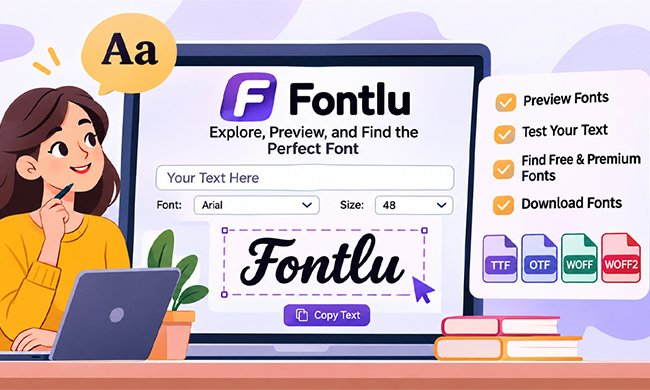
Picking the right font can change the whole look of a design. A clean font can make a website easy to read. A bold font can make a poster stand out. The right choice can make simple words look much better.
This is where Fontlu can be helpful. Fontlu is an online font website where users can explore fonts and test their own text. You can see how a name or short line looks before making a final choice.
In this guide, we will explain what Fontlu is and how it works. We will also look at its preview tool, font styles, file formats, free and paid fonts, licenses, safety, and other useful details.
What Is Fontlu?
Fontlu is a website made for people who want to explore fonts. Its main idea is simple. You enter your own text and see how that text looks with a chosen font. This can help you find a style you like.
Think about making a logo for a small shop. You may have the perfect name, but you are not sure which font looks best. Fontlu lets you test that name before you start the full design.
Fontlu can be useful for logos, websites, posters, social posts, and other designs. It can help designers, bloggers, students, website owners, and small businesses. It is mainly a simple place for early font testing.
How Does Fontlu Work?
Fontlu works through a web browser. You do not need to open a big design program just to test a few words. This makes the process simple for people who only want a quick font preview.
You can enter the words you want to test. Next, choose an available font and set the text size. The tool then shows how your words look. You can try another font and compare the results.
It is best to use your real text when testing fonts. If you are making a logo for “Sunny Cafe,” test those exact words. This gives you a much better idea of how the final design may look.
Fontlu Font Preview Tool
One of the main parts of Fontlu is its font preview tool. The public tool lets users type text, pick a font, change its size, and view the result. It also includes an option to copy the text.
Some familiar font choices reported on the tool include Arial, Verdana, Courier New, Comic Sans, and Times New Roman. These styles can give users a simple way to see how different fonts change the feel of their words.
The tool has also been called a “Font Creator Tool.” However, it works more like a preview tool. It does not appear to offer the full tools needed to build a new font letter by letter. It is better for testing existing styles.
Fontlu Fonts and Popular Styles
There are many kinds of fonts, and each one can give a different feeling. Serif fonts have small details at the ends of letters. They are often seen in books, magazines, and more formal designs.
Sans-serif fonts have a cleaner look. They are common on websites, apps, and modern designs. Script fonts can look like handwriting. They may work well for invitations, logos, or short headings.
There are also display fonts, which are made to stand out in posters and large titles. Monospace fonts give each letter the same amount of space. They are often used for coding. Fontlu can help you compare styles before choosing one.
Fontlu Font Formats Explained
Font files come in different formats. Two common formats linked with Fontlu are TTF and OTF. TTF means TrueType Font. It is a popular format that works with many computers and design programs.
OTF means OpenType Font. It is also widely supported. Some OTF fonts may include extra design features, depending on how the font was made. Both TTF and OTF are often used for desktop design work.
Websites may use WOFF or WOFF2 instead. These formats are made for web browsers and can help with web font delivery. Remember that a file format does not tell you what you are allowed to do with a font. The license does that.
Are Fontlu Fonts Free?
Fontlu mentions both free and premium font options. This can sound simple, but there is an important point to understand. A font that costs nothing to download may still have rules about how you can use it.
For example, a font could be free for a school project or personal poster. The same font may need a paid license if you want to use it in a company logo, product package, or paid advertisement.
Premium fonts normally require payment. Their prices and rights can be different for each font. Before using any Fontlu font, check its current price, source, and license. This small step can prevent problems later.
Fontlu Licensing and Commercial Use
A font license tells you what you can and cannot do with a font. This matters if you plan to use Fontlu fonts for business work. Downloading a font does not mean you own all rights to it.
Some fonts may allow personal and business use. Others may only allow personal use for free. Special rights may also be needed for websites, apps, products, merchandise, e-books, or client projects.
Always check the license for the exact font you want. If possible, check the original designer or official seller too. Never assume that “free download” means “free for every use.” A quick license check can save a lot of trouble.
How to Use Fontlu Fonts in Designs
Once you find a font you like, the next step is to test it in your real design. A font may look great in a small preview. However, it can look very different on a logo, poster, or social media post.
If a font can be downloaded, check its source and license first. Then, choose the right file type. TTF and OTF files work with many common design programs. You may need to install the font on your computer before using it.
Try the font with different words and sizes. Look at numbers and special signs too. Most of all, make sure people can read it easily. A beautiful font is not very useful if your readers cannot understand the words.
Using Fontlu Fonts on Websites
Choosing a font for a website needs extra care. The font should look good on a computer, tablet, and phone. It should also be easy to read in both large headings and small paragraphs.
WOFF and WOFF2 are common font formats made for websites. File size matters too. A very large font file may slow down a page. This can make the website less pleasant for visitors, mainly on slower connections.
You should also use a backup font. If your main font does not load, the browser can show another one. Most importantly, check that the font license allows website use before adding it to a live site.
Who Should Use Fontlu?
Fontlu may be useful for many types of users. Graphic designers can test a business name or heading before starting a full design. Bloggers can compare fonts for blog graphics, banners, and featured images.
Small business owners may also find Fontlu useful. Imagine you are starting a small coffee shop. You can enter your shop name and test a few styles. This may help you find the type of look you want.
Students and new designers can use the tool for simple font testing too. Website owners, marketers, and content creators may also find it helpful. Fontlu works best for people who want a quick first look at different font styles.
Is Fontlu Safe to Use?
As of 2026, Fontlu.net is known as a live website with a public font preview tool. Still, users should follow normal safety steps when downloading any file from a font website.
Check where the font file comes from before opening it. Font files often come as TTF or OTF files. They can also be packed inside ZIP files. Be careful if a font download asks you to run an unknown program.
It is also smart to check the font creator and original source. Scan unknown downloads with trusted security software. For important business work, avoid fonts when the source or license is not clear.
Fontlu Benefits and Limitations
One good thing about Fontlu is its simple design. You can test your own words without opening a large design program. This makes quick font checks easier for beginners and people working on early design ideas.
Fontlu also has limits. It should not be seen as a full professional font editor. Some websites mention advanced Fontlu features, but not all of those claims have been clearly confirmed on its public website.
The full size of its font library is also unclear. Font choices and download options may change over time. Fontlu can be useful for exploring ideas, but professional projects still need more checks before a font is used.
Fontlu vs Google Fonts and Other Alternatives
Fontlu is not the only place to explore fonts. Google Fonts is a popular choice for free and open-source fonts. It is especially useful for websites and offers clear information about using its font collection.
Adobe Fonts is another choice. It is made more for professional creative work and works closely with Adobe design tools. DaFont is known for many fun and unusual styles. However, each DaFont font can have its own license rules.
Fontshare is another option for people looking for modern font families. There is no single best choice for everyone. Fontlu may suit quick testing, while other services may be better when you need a large library or clearer use rights.
Tips for Choosing the Right Font
Always test the real words you plan to use. A font may look great with sample text but not with your business name. Try uppercase and lowercase letters. Also test numbers, prices, and special signs when needed.
Size matters as well. Some fonts look amazing in a large title but become hard to read in a small paragraph. If the font is for a website, test it on both a phone and a computer.
Try not to use too many fonts in one design. Two clear styles are often enough. Make sure the font supports the language you need. Finally, check the license before using any font for paid or business work.
Conclusion
Fontlu is a simple online resource for people who enjoy exploring fonts. Its preview tool can help you enter your own words, try different styles, change the size, and get an early idea of what looks good.
The main thing to remember is that Fontlu is best used as a starting point. A nice preview does not tell you everything. You still need to think about readability, file type, font source, character support, and use rights.
For quick font ideas in 2026, Fontlu may be worth exploring. Just take a little extra care before using any downloaded font in a website, logo, product, or paid project. Check the source and license first, then design with confidence.
(FAQs)
Is Fontlu really a font creator?
No. Fontlu mainly works as a font preview tool. You can test text in different styles, but it is not a full tool for making new fonts from scratch.
Are all Fontlu fonts free for business use?
No. This may surprise some users. A free download does not always mean free business use. Always check the license before using a font for logos, products, or paid work.
Is Fontlu safe to use?
Fontlu has a public font preview tool. Still, users should check the source of any downloaded file. Avoid unknown programs, and scan files when the source is not clear.
Can I use Fontlu fonts on my website?
It depends on the font and its license. Some fonts allow web use, while others may not. You should also check whether proper web font files are available.
Is Fontlu better than Google Fonts?
It depends on your needs. Fontlu can help with quick font testing. Google Fonts is often better for free web fonts because its collection has clear open-source licenses.
Up Next: Plangud: The Complete Guide to Wooden Planks and More
