

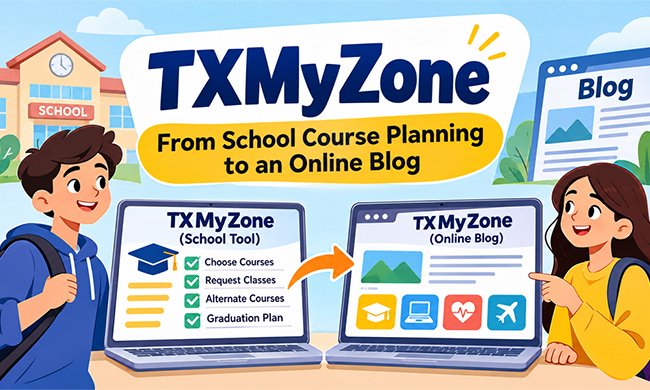
Have you ever searched for an old school website and found something very different from what you expected? This is what happens with TXMyZone. Some people know it as a tool that helped Texas students choose school courses. Others find a website that shares articles about education and daily life.
TXMyZone has an interesting story. It was linked to the older TxEIS school system. Some Texas schools used it to help students plan their classes for the next school year. Today the name also appears on a general blog. This can make things confusing for new readers.
In this guide we will explore the history of TXMyZone. We will explain how it worked and what features it offered. We will also look at its benefits and why its name is still found online in 2026.
What Is TXMyZone?
TXMyZone was an online tool used by some Texas schools. Its main job was to help students request courses for the next school year. Instead of filling out paper forms, students could use a computer to choose the classes they wanted.
The tool worked with the older TxEIS school system. Schools could set up course lists and allow students to view their choices. Students could then select classes based on their grade and school needs.
TXMyZone was not a full online learning system. It was not mainly made for watching lessons or doing daily homework. Its main purpose was course planning. It helped students share their class choices with school staff.
The name TXMyZone is also used by a current website. That website shares articles about many topics. These include education, health, business, travel, food, and technology. However, there is no clear proof that this blog is the same service as the old school tool.
The History of TXMyZone
In the past, many schools used paper forms to collect course choices. Students wrote down the classes they wanted for the next school year. Then school staff had to check each form and enter the details into the school system.
This work could take a lot of time. It was also harder to find out which classes students wanted most. If many students picked the same class, the school had to plan for that demand.
TXMyZone helped make this task easier. Students could send their course requests online. School staff could then review the choices and use them when making class plans.
The tool was linked to TxEIS. This was an older school software system used by some Texas districts. Over time, school software changed. Many districts began moving to ASCENDER. This is one reason the old TXMyZone links may no longer work.
How Did TXMyZone Work?
The process started with the school. School staff prepared a list of courses that students could choose from. They also set the dates when students could make their requests.
After that, students could log in and view the courses available to them. The choices were not the same for everyone. A student in ninth grade could have a different list from a student in twelfth grade.
Students then picked the classes they wanted for the next school year. They could review their choices before sending their requests. In some cases, they could also choose backup courses.
For example, imagine a student who wants to study art. The student picks art as the first choice and another subject as a backup. If the art class is full, school staff may consider the backup choice.
However, choosing a class did not mean the student would always get a place. Some classes had limited seats. Other courses could take place at the same time. Students also had to meet the course rules.
School staff checked the requests before making the final schedules. This helped them plan classes based on student needs and the number of available teachers and rooms.
Main Features of TXMyZone
TXMyZone offered useful tools for students and school staff. Its main feature was online course selection. Students could see the courses their school offered and send their choices without using paper forms.
Another helpful feature was alternate course selection. Students could pick backup classes in case their first choices were not available. This gave schools more options when making class schedules.
Some schools also used graduation planning features. These could help students understand which credits they had earned and which subjects they still needed. This was useful for high school students who were working toward graduation.
School staff also had control over access. Historical TxEIS information describes settings such as Open, View, and Closed. Open access allowed eligible students to make requests. View access could let them see information without changing it. Closed access stopped new requests.
Schools could also set rules for different grade levels. This meant students only saw choices that were right for their school year. The exact features depended on the district and its settings.
Benefits of TXMyZone for Students and Schools
One of the biggest benefits of TXMyZone was that it made course planning easier. Students could check their choices online and send their requests from one place. They did not have to depend only on paper forms.
It also helped students think about their future classes. They could choose subjects they liked while keeping their school needs in mind. Backup choices gave them another option if a class was full.
Schools also gained useful benefits. Staff could review course requests in one system. They could see which classes were popular and use that information when planning the next school year.
For example, if many students wanted to take a science class, the school could consider that demand when planning its schedule. This could help staff make better use of teachers and classrooms.
Still, TXMyZone did not make the final school schedule by itself. Staff had to check course rules, class sizes, teacher availability, and timetable problems. It was a helpful planning tool, but schools still made the final decisions.
TXMyZone Login and Access Problems
In the past, students could use a school-provided link to open TXMyZone. However, there was no single login page for every student in Texas. Each school or district could have its own link and login rules.
Some students may still find old TXMyZone login pages online. But these pages may no longer work. The school may have moved to a newer system. The course request period may also be over.
If you cannot log in, do not keep trying random websites. First, visit your school’s official website. You can also ask your teacher, counselor, or school office for help. They can tell you which system is in use today.
Students should also protect their private details. Never enter your password, student ID, or birth details on an unknown website. An old login page does not mean the service is still active.
TXMyZone vs. ASCENDER StudentPortal
TXMyZone was linked to the older TxEIS school system. It mainly helped students request courses for the next school year. It also supported backup course choices and some graduation planning features.
ASCENDER StudentPortal is part of a newer school system. Some Texas schools use it to give students access to school information. Depending on the district, students may be able to check grades, attendance, and other school details.
Both systems can support course planning. However, they are not the same tool. ASCENDER is the newer system, while TXMyZone was linked to the older TxEIS system.
The features can also change from one school to another. One school may offer more online tools than another. Students should always follow the instructions given by their own school.
What Is the TXMyZone Website Today?
The TXMyZone name is still used by a website today. However, the current website is different from the old school tool. It presents itself as a resource blog that shares helpful articles on many subjects.
Visitors can find content about education, technology, business, health, travel, food, fashion, and lifestyle. It also has pages such as About, Contact, and website policies.
For example, someone may visit the website to read about a travel topic or learn about a new technology idea. Another reader may find an article about school planning or student tools.
This makes the current TXMyZone website more like an online magazine than a school portal. It shares written information instead of giving students direct access to school records.
There is no clear proof that the current blog is connected to the older Texas school system. So readers should keep these two uses of the name separate.
Why Is TXMyZone Confusing for Readers?
One reason TXMyZone is confusing is that different websites describe it in different ways. Some articles call it a student portal. Others describe it as a social network, learning platform, or online payment tool.
Some pages also claim that it offers profiles, private messages, local groups, online classes, and special digital tools. However, these features have not been clearly confirmed through reliable product information.
The older school tool has a much clearer history. It was linked to TxEIS and helped students request courses. This use is supported by historical school system information.
Readers should not believe every claim they see online. Before trusting a website, check who runs it and whether it provides real proof of its features.
A simple rule can help. If a website claims to offer student records, school access, or private accounts, look for an official school link before using it.
Is TXMyZone Safe to Use in 2026?
Safety is important when using any website. This is even more important when a website asks for private details. Students should be careful when searching for an old TXMyZone login page.
The safest choice is to use a link from the official school or district website. Check the full website address before entering any details. A small change in a website name can lead to a different page.
Also, remember that HTTPS does not prove that a website is run by your school. It helps protect information sent between your browser and the website. It does not prove that the website is genuine.
Never share your school password, student ID, birth details, or private records with an unknown site. If you use a shared computer, sign out after you finish.
If a TXMyZone page takes you to an unexpected website, leave it. Ask your school for the correct link instead. This small step can help protect your information.
Conclusion
TXMyZone has two different uses that readers should understand. In the past, it was an online course request tool linked to the older TxEIS school system. Some Texas schools used it to help students choose classes for the next school year.
It supported course requests, backup choices, and graduation planning where available. It also helped school staff review student choices and prepare class schedules. Later, many districts moved toward newer systems such as ASCENDER.
Today, the TXMyZone name is also used by a general resource blog. It shares articles about education, technology, business, health, travel, and other topics. However, there is no clear proof that this blog is the same service as the old school tool.
So, what should students do today? They should visit their official school website and check which student portal is currently in use. If they need help, they can contact their school office or counselor.
The main lesson is simple. Do not judge a website by its name alone. Check its purpose, owner, and official links before sharing private information. This will help you find the right TXMyZone service and avoid confusion.
(FAQs)
What was TXMyZone mainly used for?
TXMyZone helped students in some Texas schools choose courses and send class requests for the next school year.
Does TXMyZone still work in 2026?
The old school tool may no longer work in many districts. Schools may now use ASCENDER or another student portal.
Is TXMyZone the same as ASCENDER StudentPortal?
No. TXMyZone was linked to the older TxEIS system. ASCENDER StudentPortal belongs to the newer school system.
Is the current TXMyZone website a school portal?
No clear proof supports this claim. The current website presents itself as a general blog with articles about education, health, business, and technology.
Can students safely use old TXMyZone login links?
Students should avoid unknown login links. They should use the official school website to find the correct portal and protect their private information.
Up Next: Fanisco: The Complete Guide to Its Meaning and Business
