

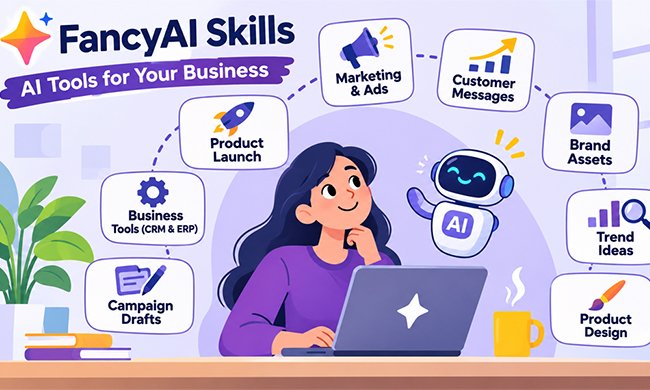
AI is changing how businesses work. Today, many companies use AI to write content, plan ads, answer customers, and manage daily tasks. But what if one platform could help with many of these jobs?
This is where FancyAI Skills comes into the picture. It is an AI platform that offers special tools for business work. These tools are made to help with marketing, customer care, product launches, and design.
In this article, we will explore FancyAI Skills in simple words. We will look at its eight main skills, how the desktop app works, and what other tools it offers. We will also explain how businesses may use it in their daily work.
What Are FancyAI Skills?
FancyAI Skills are special AI tools made for different business tasks. Each skill has its own job. For example, one can help with customer messages, while another can help create ads or product content.
The main idea is to save time and make daily work easier. A business may have many tasks to complete each day. FancyAI aims to bring some of these tasks into one place.
Unlike a basic AI chatbot, FancyAI focuses on business work and connected tools. It aims to use company files and data to help people get better results. However, the features and access may depend on the product and setup.
How Do FancyAI Skills Work?
The basic idea is simple. A user chooses a task and gives the AI the right details. The tool then uses that information to create a result.
For example, imagine an online store that wants to add a new phone to its website. The team can provide the phone’s name, price, size, and main features. AI may then help write a clear product description.
Some FancyAI tools are also designed to work with business software. This may help teams use their existing data instead of adding the same details again and again.
Still, AI needs human help. It can make mistakes or miss important facts. Users should check the results before sending messages, publishing ads, or sharing product details.
What Are the 8 Main FancyAI Skills?
FancyAI lists eight main skills on its desktop product page. Each one is made for a different type of work. Together, they aim to help teams manage more tasks with less manual effort.
Here is a simple look at all eight skills and what they may do.
CRM Workflows
CRM Workflows focuses on customer records and messages. It may help businesses find customers who have stopped buying or may need a follow-up.
For example, an online shop could use customer history to prepare a message for someone who has not placed an order in months.
ERP Launch
ERP Launch is made to help with new product launches. ERP systems store details about products, stock, prices, and orders.
This skill may turn product details into product sheets and marketing content. It can help teams prepare launch materials faster.
DAM Library
DAM means digital asset management. It is a system used to store files like logos, photos, videos, and brand images.
The DAM Library skill aims to help teams find and reuse the right files. This can save time and help keep a brand’s look the same.
Campaign Drafting
Campaign Drafting helps create marketing ideas and written content. It may prepare campaign plans, ad text, and landing page content.
For example, a business selling shoes could use it to create different ad headlines for a new shoe launch.
Performance Creative
Performance Creative focuses on past ad results. It aims to help teams use successful ideas to make new ads.
A company can study which ad messages worked well and create fresh versions to test. However, more clicks do not always mean more sales.
Trend Monitoring
Trend Monitoring helps find new topics and social media trends. It may turn these topics into ideas for posts, captions, and images.
For example, a clothing brand could use a popular topic to plan a post. The topic should still match the brand and its audience.
Product Design
Product Design helps teams explore new product ideas. It may suggest colors, patterns, shapes, and styles.
A clothing team could use it to explore new shirt designs before making real samples. A designer should still check the final work.
Desktop Command Center
The Desktop Command Center aims to bring files, business tools, and AI agents into one workspace.
This can help teams manage different tasks from one place. Its real value depends on how well the needed tools connect and work together.
How Does FancyAI Desktop Work?
FancyAI also offers a desktop app for business users. It is designed to give users a place to work with AI skills, files, and connected tools.
One useful part is its focus on local files. This means users may be able to work with files stored on their own computers. The company also presents the app as a way to manage business work from one place.
However, users should check how each feature handles files and data. They should also learn what access the app needs before connecting important company accounts.
What Other Products Does FancyAI Offer?
FancyAI offers more than its desktop skills. Its website also lists other products for people and businesses with different needs.
These include the AI Experts API, which is made for connecting AI experts with other software. It also lists AI Training Data and Post-trained Models for work related to AI data and model use.
FancyAI also lists FDE services. These are aimed at helping businesses with AI setup and launch. These products are different from the eight desktop skills, so users should check each product before choosing one.
Which Tools Can FancyAI Connect With?
FancyAI lists several business tools and services that may connect with its desktop platform. These connections can help teams work with the tools they already use.
Some of the listed names include Salesforce and HubSpot for customer records. It also lists Meta Ads, TikTok Ads, and Instagram for marketing and social media work.
Other listed tools include Slack, Gmail, Google Drive, Notion, and Canva. FancyAI also names ERP systems and DAM libraries.
These connections may make work easier. However, not every action may be supported. Before using a connection, check what information the app can read and what tasks it can perform.
Who Can Benefit From FancyAI Skills?
FancyAI Skills may be useful for businesses that handle many repeated tasks. Small businesses can use suitable AI tools to prepare product details, write messages, and plan simple marketing work.
Marketing teams may find the campaign and trend tools useful. Online stores may benefit from product content and launch support. Designers may also use Product Design to explore fresh ideas.
However, FancyAI may not be right for every company. A small business with only a few tasks may not need a large set of AI tools. It is better to check the features and costs first.
What Can You Do With FancyAI Skills?
FancyAI Skills may help businesses with many daily tasks. For example, an online store can use AI to prepare product details and write simple ads. This can save time when adding new items to a website.
Marketing teams can also use it to plan campaigns and find new content ideas. A team can study past ads and create new versions to test. This may help them find better ways to reach customers.
Design teams may use AI to explore new colors and styles. Customer teams may also prepare follow-up messages. Still, every result should be checked before it is used.
What Are the Main Benefits of FancyAI Skills?
One main benefit of FancyAI Skills is that they may save time. Many businesses do the same tasks every day. These tasks include writing product details, preparing emails, and making ads. AI may help with the first draft.
Another benefit is that teams can explore more ideas. For example, a business can ask AI to create five ad headlines instead of writing each one by hand. The team can then choose the best idea and make changes.
FancyAI may also help keep brand content in one style. Teams can use approved images and clear brand rules. However, good results depend on the tools and the quality of the data.
What Are the Limitations of FancyAI Skills?
FancyAI Skills may be useful, but they are not perfect. AI can make mistakes. It may write the wrong price or give false product details. This is why users should check all important facts.
Another problem is setup. Some tools may need access to company files or other business systems. Setting up these links can take time. Small teams may also need help from a technical expert.
There is also the risk of poor results. If users give unclear instructions, the AI may not understand the task. Some results may need many changes before they are ready to use.
FancyAI Skills Pricing and Plans
FancyAI has a credit-based payment option for its AI model gateway. Its public pricing page lists credit choices of $10, $25, $50, and $100. Users can also choose a custom amount.
The company says these credits do not expire. It also says users do not need a monthly plan for this pay-as-you-go option. This may help people who want to use AI when needed.
However, these prices do not confirm the full cost of the desktop skills. Some business services may have different prices. Before paying, check which tools are included and whether extra fees apply.
Is FancyAI Safe for Business Use?
Safety is very important when using AI for business work. Companies may have private customer details, sales records, product plans, and other files. They should know how their data is used before sharing it.
FancyAI has a privacy policy and user agreement. These explain some rules about data and user accounts. The company also says users must have the right to share the information they give to its tools.
Before using FancyAI Skills, check its data rules. Find out where your files are stored and who can access them. Also check if you can delete your data. Start with test files before adding private company records.
How to Get Started With FancyAI Skills
Getting started with FancyAI can be simple if you take one step at a time. First, visit the official FancyAI website and explore its desktop app and other products. Read the details before choosing a tool.
Next, choose one task you want help with. For example, you may want to write product descriptions or prepare social media content. Check if the right skill is available for that task.
After that, provide clear details and test the result. Check for mistakes and see how much time the tool saves. If the results are useful, you can try more skills later.
Tips for Getting Better Results With FancyAI
Clear instructions can help you get better results from AI. Tell the tool what you need and who will read the content. For example, if you need an ad, explain the product and the type of customer you want to reach.
Always provide correct details. If you give the wrong price or product size, the AI may use that wrong information in its answer. Good information helps the tool create more useful results.
You should also check every result before using it. Keep private details safe and avoid giving access to files that the tool does not need. Start with small tasks and learn how the tool works.
FancyAI Skills vs. General AI Chatbots
FancyAI Skills and general AI chatbots both use AI, but they have different goals. FancyAI focuses on special business tasks. General chatbots can help with many types of work.
For example, a general chatbot can help write an email, explain a topic, or create ideas. FancyAI aims to connect its skills with business tools and company data. This may help teams manage repeated tasks in one place.
| Feature | FancyAI Skills | General AI Chatbots |
|---|---|---|
| Main use | Business tasks | Many types of tasks |
| Marketing | Special tools | General help |
| Product work | Launch support | Writing help |
| Connections | Listed business tools | Depends on the chatbot |
| Best use | Repeated work | Daily questions and ideas |
The right choice depends on your needs. A small business may only need a basic chatbot. A larger team may want special tools that connect with its business systems.
Is FancyAI Skills Worth Using?
FancyAI Skills may be worth testing if your business handles many repeated tasks. Its tools cover customer work, product launches, ads, trends, and design. These features may help teams save time and manage work more easily.
However, it is important to check the real cost and available features. A tool may sound useful, but it may not fit your daily work. You should also check how much editing its results need.
A good way to decide is to test one small task first. Compare the time and effort with your normal work. If it gives useful results and saves time, you can think about using more features.
Conclusion
FancyAI Skills is an AI platform made to support different business tasks. Its eight advertised skills cover customer messages, product launches, brand images, ads, trends, and design.
The desktop app also aims to bring files and business tools into one place. Its listed connections may help teams work with software they already use. However, users should check which features and actions are available to them.
Overall, FancyAI Skills may be useful for businesses that want help with daily work. But it should not replace human care or smart decisions. Check the price, privacy rules, and features before paying. A small test is a good way to see if it meets your needs.
(FAQs)
What makes FancyAI Skills different from normal AI chatbots?
FancyAI focuses on business tasks and aims to connect AI with company files and tools.
How many AI skills does FancyAI offer?
FancyAI lists eight main skills. They cover customer work, product launches, marketing, ads, trends, and design.
Can FancyAI Skills run a business automatically?
No. They may help with daily tasks, but people still need to check results and make final choices.
How much do FancyAI Skills cost?
FancyAI lists AI gateway credits from $10 to $100. However, the full price of its desktop skills is not clearly confirmed.
Can FancyAI Skills access private business files?
The desktop app is designed to work with local files and connected tools. Check its privacy rules and access settings before sharing private data.
Up Next: TXMyZone: From School Course Planning to an Online Blog
